

Fini_Transfer__c checkbox on the case, and Salesforce can also receive Fini widget escalations as new Cases.
Connect Fini to Salesforce so your AI agent can read incoming case emails and case comments, draft replies, and respond inside the Case timeline. Salesforce is the most setup-heavy of Fini’s deploy integrations: in addition to the in-Fini connection step, you create a Connected App in your Salesforce org and (for the full integration) build two record-triggered Flows that send incoming events to Fini.
At a glance
Two deployment modes.
- Full Salesforce integration (Fini replies on incoming Salesforce email cases): requires every step on this page, including the Connected App, custom case fields, Named Credentials, External Service, and two Salesforce Flows.
- Widget-only deployment (Salesforce is just a destination for conversations created by the Fini widget): only the in-Fini connect step is required. You can skip the Manual Salesforce setup section entirely. Configure the escalation under Widget → Escalate to Salesforce.
Before you connect
You’ll need:- A Salesforce account with permission to create and install Connected Apps. Typically a System Administrator or a user with the Customize Application permission.
- An understanding of whether the target org is production or a sandbox. Sandbox orgs use a different OAuth login domain.
- A Connected App created in your Salesforce org. The Connected App provides the Consumer Key and Consumer Secret you’ll paste into Fini.
- At least one agent already created in Fini. If you haven’t created one yet, do that first from Agent home.
Create a Connected App in Salesforce
In your Salesforce org: Setup → App Manager → New Connected App. Configure these settings:- Enable OAuth Settings.
- Callback URL:
https://api-prod.usefini.com/v2/integrations/salesforce/auth/callback - Selected OAuth Scopes: at minimum
Manage user data via APIs (api),Access the identity URL service (id, profile, email, address, phone), andPerform requests at any time (refresh_token, offline_access). - If your org requires Proof Key for Code Exchange (PKCE) for OAuth authorization-code flows, leave that policy enabled. Fini sends the PKCE challenge automatically during authorization.
- Enable Issue JSON Web Token (JWT)-based access tokens for named users if your org’s policy requires it.
What Fini does with your Salesforce
The OAuth scopes Fini requires are determined by the Connected App you create in your Salesforce org. Make sure the Connected App grantsapi, id, and refresh_token. The full list of side effects performed during and after authorization:
- Read user info (
organization_id,user_id) to identify the connected org. - Describe the Case object to discover existing custom fields.
- Create two custom Case fields if they don’t already exist:
Fini_Skip_Webhook__c(Checkbox): when checked on a case, Fini skips reply processing for that case.Fini_Transfer__c(Checkbox): set automatically by Fini when the agent escalates a case to a human agent.
- Read incoming Email Messages and Case Comments routed to Fini by the Salesforce Flows you create (see below).
- Post replies as Email Messages or Case Comments when a mapped agent decides to respond.
Connect Salesforce in Fini
When you first open the Salesforce deploy page, the Connection Details panel asks for your Salesforce credentials.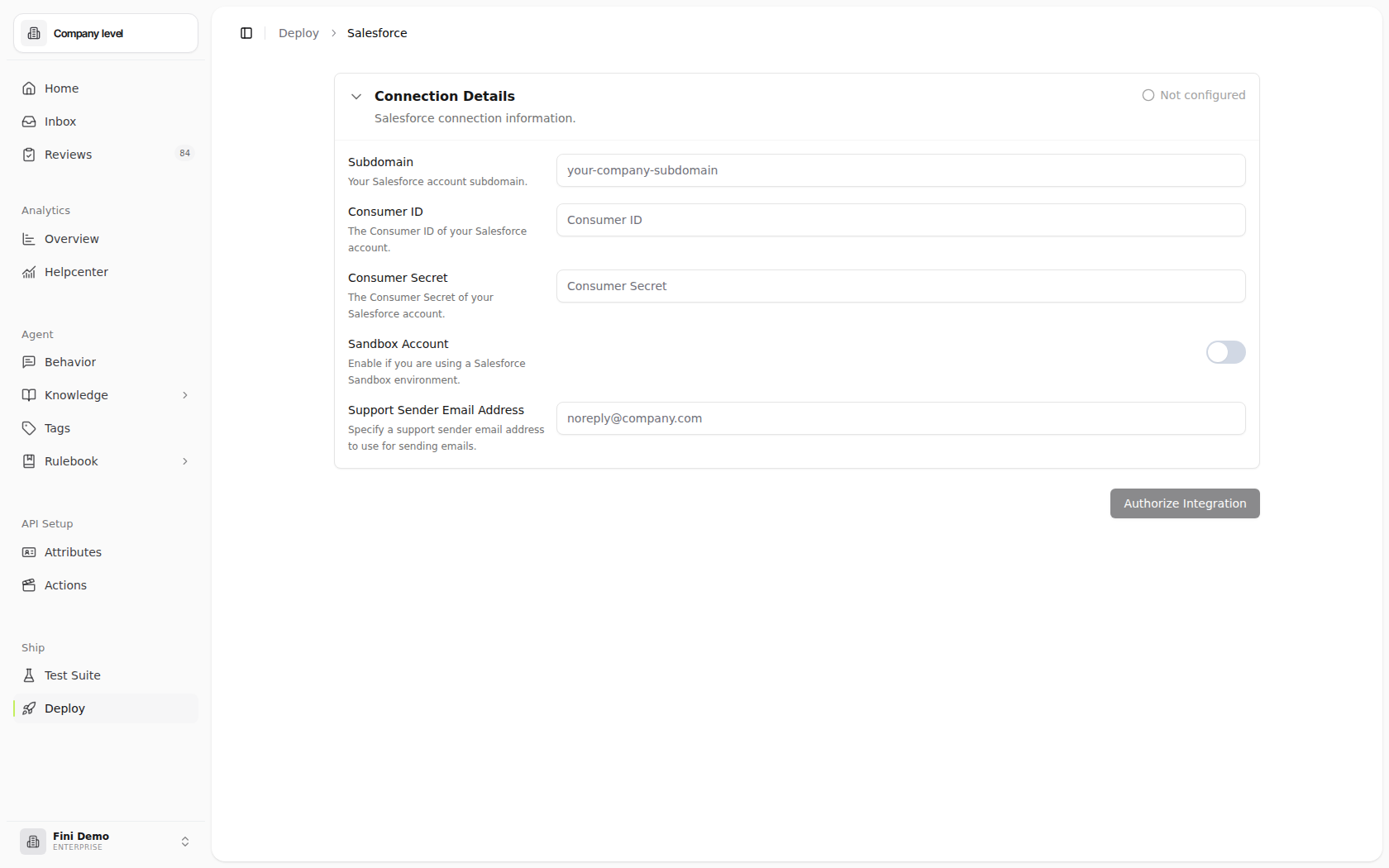
1
Fill in the Connection Details form
- Subdomain: your Salesforce instance subdomain (the part before
.my.salesforce.comor.salesforce.com). - Consumer ID: the Consumer Key from your Connected App.
- Consumer Secret: the Consumer Secret from your Connected App.
- Sandbox Account: enable the toggle if you’re connecting a Salesforce Sandbox org. Leave off for production orgs.
- Support Sender Email Address: the email address Fini should use as the sender when posting replies. This stays editable after authorization.
2
Click Authorize Integration
A Salesforce login window opens at
login.salesforce.com (or test.salesforce.com for sandboxes). Sign in with the user account you want Fini to act as. Approve the requested permissions.3
Return to Fini
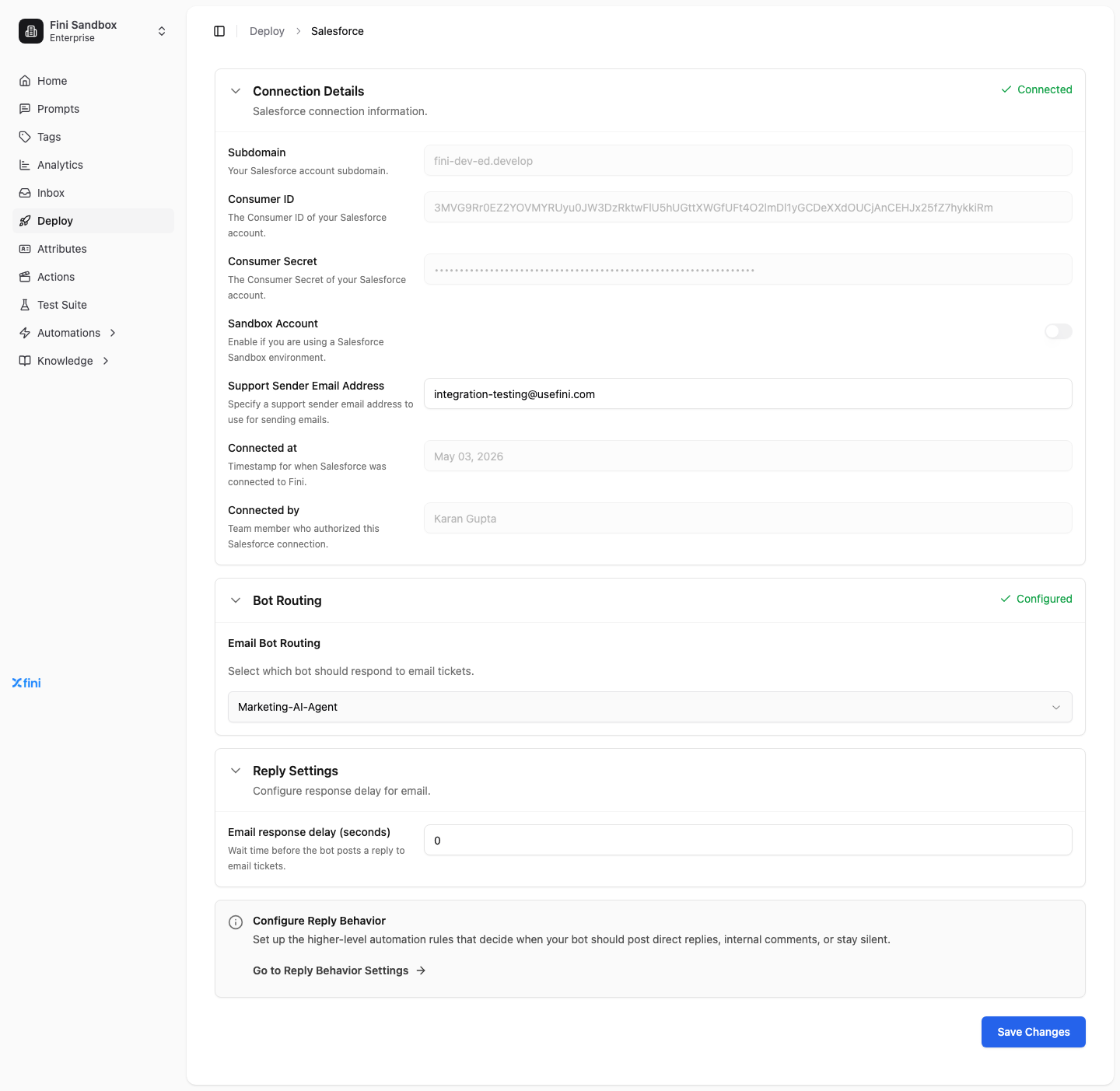
Once Salesforce redirects you back, the page expands to show your connection metadata and the Agent Routing and Reply Settings sections appear.
Configure your deployment
After connecting, three sections appear on the Salesforce deploy page. Each is independent.Connection Details
Read-only metadata about the integration (the credential fields lock once authorized):- Subdomain, Consumer ID, Consumer Secret, Sandbox Account: the values you supplied. Locked.
- Support Sender Email Address: stays editable. Update it any time the email Fini sends from needs to change.
- Connected at: timestamp of the most recent successful authorization.
- Connected by: team member whose account authorized the integration.
Agent Routing
Salesforce routing is single agent, single channel. Pick one Fini agent to handle all incoming email cases. There’s no per-brand or per-inbox split, and no chat channel.- Email Agent Routing: pick the Fini agent that should respond to Salesforce Email Messages and Case Comments.
Reply Settings
Controls how long Fini waits before posting a reply.- Email response delay (seconds): wait time before the agent posts on case threads.
0 makes the agent reply as soon as it has an answer. Higher values give human agents a chance to take over first.
Configure reply behavior
Reply Behavior decides when the agent posts a public Email Message versus an internal Case Comment versus stays silent. Click Go to Reply Behavior Settings on the Salesforce page to configure these rules. They apply across all channels, not just Salesforce.Manual Salesforce setup
Skip this entire section if you’re only using Salesforce as a destination for widget conversations. The Flows below exist to forward incoming Salesforce events to Fini. If Fini isn’t replying to incoming Salesforce traffic, no Flows are needed.
Verify the custom fields are synced
After authorizing in Fini, open your Salesforce org and confirm the two custom Case fields exist. In Salesforce: Object Manager → Case → Fields & Relationships. Look for:
If both are present, skip ahead to Make the fields visible to the Fini user profile.
If either is missing, the authorizing user likely lacks Tooling API access. Create the fields manually as described next.
If the custom fields are missing
Create both fields manually in Object Manager → Case → Fields & Relationships → New. Fini Skip Webhook:customTicketFields map on the integration object). Without this registration, Fini will not know the fields exist and the skip/escalation behaviors will not work.
Make the fields visible to the Fini user profile
Both fields exist, but they need to be readable by the Salesforce user Fini authenticates as. For each field, in Object Manager → Case → Fields & Relationships → [field name] → Set Field-Level Security, check the Visible box for the user profile Fini uses.Create the Named Credentials
Salesforce Named Credentials store the URL and authentication header Fini’s webhook requires.1
Open Named Credentials
In Salesforce Setup, search for Named Credentials in Quick Find. Open the Named Credentials page.
2
Create the External Credential
Click New External Credential. Fill in:
- Label:
FiniExternalCredentials - Authentication Protocol:
Custom
- Key:
x-fini-salesforce-api-key - Value: ask the Fini engineering team for the API key.
3
Create the Named Credential
Click New Named Credential. Fill in:
- Label:
FiniWebhookSiteNamedCredentials - URL:
https://api-prod.usefini.com/v2/integrations/salesforce/ask-question - Enabled for Callouts: checked.
- External Credentials: select
FiniExternalCredentials(the one you just created). - Generate Authorization Header: checked.
Create the External Service
The External Service exposes Fini’s webhook to Salesforce Flows as a callable action.1
Open External Services
In Setup, go to External Services and click New External Service.
2
Fill in the basic details
- Service Name:
FiniWebhookSiteExternalService - Creation Source: From API specification
- Named Credential:
FiniWebhookSiteNamedCredentials - Service Schema: Complete
3
Paste the schema
Paste this OpenAPI schema into the Service Schema field:Click Next, then Save & Finish.
Create the Email Message Flow
This Flow forwards every newly created Email Message to Fini.1
Start a new Record-Triggered Flow
Setup → Flows → New Flow → Record-Triggered Flow.
2
Configure the start
- Object: Email Message
- Trigger the Flow When: Record is created
- Set Entry Conditions: None
- Optimize the Flow for: Action and Related Records
- Enable Add Asynchronous Path
3
Add the request body assignment
On the Asynchronous path, add an Assignment node labeled
RequestBodyEmailMessage.Create a new variable resource:- Resource Type:
variable - API Name:
requestBody - Data Type:
Apex-Defined - Apex class:
ExternalService__FiniWebhookSiteExternalService_FiniWebhookSiteInvocableAction_IN_body - Availability Outside the Flow: check Available for input and Available for output.
requestBody:4
Add the action
On the Asynchronous path, add an Action node:
- Action group: External Services →
FiniWebhookSiteExternalService - Select Fini Webhook Site Invocable Action
- Label:
Fini Webhook Site Invocable Action - Body:
requestBody - Show Advanced Options: enable Always continue in current transaction
5
Save and activate
Save the Flow with the label
TriggerFiniForEmailMessage. Activate it.Create the Case Comment Flow
This Flow does the same for Case Comments. The structure is identical to the Email Message Flow with two changes: the triggering object and thecaseId value source.
1
Start a new Record-Triggered Flow
Setup → Flows → New Flow → Record-Triggered Flow.
2
Configure the start
- Object: Case Comment
- Trigger the Flow When: Record is created
- Set Entry Conditions: None
- Optimize the Flow for: Action and Related Records
- Enable Add Asynchronous Path
3
Add the request body assignment
Add an Assignment node labeled
RequestBody. Use the same requestBody variable definition as in the Email Message Flow (Apex-Defined, same class).Add three assignments:Note that
caseId uses $Record.Parent.Id here because Case Comment’s parent is the Case (in the Email Message Flow it was $Record.ParentId because Email Message points at the Case directly).4
Add the action
Same as the Email Message Flow: External Services action calling
FiniWebhookSiteExternalService → FiniWebhookSiteInvocableAction, body is requestBody, advanced option Always continue in current transaction enabled.5
Save and activate
Save the Flow with the label
TriggerFiniForCaseComment. Activate it.Verify it’s working
- From your Salesforce org, send a test email to the support address routed into Salesforce, or have a test contact reply to an existing case via email.
- Wait the configured response delay, then open the case in Salesforce. The mapped Fini agent should have posted an Email Message or Case Comment.
- If nothing appears, see Troubleshooting.
Common questions
Do I need to replace Salesforce or migrate my cases?
Do I need to replace Salesforce or migrate my cases?
No. Fini works on cases inside your existing org, and your team keeps working them in Salesforce. See Fini on top of your helpdesk.
What does Fini do when it can't answer?
What does Fini do when it can't answer?
It escalates the case to a human and sets the Fini Transfer (
Fini_Transfer__c) checkbox. If that field is missing from Salesforce or from Fini’s integration record, handoff doesn’t work, so confirm both fields after you connect (Verify the custom fields are synced).Can I stop Fini on a specific case?
Can I stop Fini on a specific case?
Yes. Check Fini Skip Webhook (
Fini_Skip_Webhook__c) on the case and Fini skips reply processing for it.Does Fini read internal Case Comments?
Does Fini read internal Case Comments?
Yes. The Case Comment Flow forwards every new Case Comment to Fini, alongside new Email Messages. Fini can also reply as a Case Comment, which customers don’t see.
Do I need the Flows if I only use Salesforce for widget escalations?
Do I need the Flows if I only use Salesforce for widget escalations?
No. Widget-only deployments need just the in-Fini connect step. The Flows exist only so Fini can answer incoming Salesforce traffic.
Troubleshooting
Authorization failed with “client identifier invalid”. The Connected App was just created and Salesforce hasn’t propagated it yet. Wait 5 to 10 minutes and try again. Authorization failed with “invalid_grant”. Usually means the Sandbox toggle in Fini doesn’t match the actual Salesforce environment (sandbox vs. production). Disconnect and reconnect with the correct toggle. Custom fields didn’t get created during authorization. The authorizing user lacks Tooling API access. Create the fields manually following If the custom fields are missing, then have the engineering team register them in Fini’s integration record. Fini isn’t receiving Salesforce events. Check:- Both Flows (
TriggerFiniForEmailMessageandTriggerFiniForCaseComment) are active. - The External Credential’s
x-fini-salesforce-api-keyheader value is correct (ask the Fini engineering team). - The Named Credential URL is the production URL:
https://api-prod.usefini.com/v2/integrations/salesforce/ask-question. - Check Salesforce Setup → Flows → Paused and Failed Flow Interviews for any failed runs with error details.
- Is an agent selected in Agent Routing?
- Is the agent enabled and trained?
- Is the response delay much higher than expected?
- Is
Fini_Skip_Webhook__cchecked on the case? (Agent will deliberately not reply.) - Are there Reply Behavior rules that suppress replies on this channel?