

- Knowledge composes from anywhere: past tickets, your help center, internal docs in Notion, Confluence, SharePoint, custom APIs, or anything else you can point an integration at.
- The agent deploys anywhere: every helpdesk you use, every chat surface your customers touch (website, authenticated app, mobile), your help center, voice, your internal Slack, or your own product over the API.
- Fini is the first AI layer: every customer interaction reaches Fini before it reaches a human. The agent resolves what it can; what it can’t, it escalates to your team with the full conversation, knowledge sources, and reasoning trace already in their hands.
The architecture
Read the picture left to right. Knowledge flows in from any combination of sources. Fini holds that knowledge, applies your prompts and rules, and answers on whichever deployment surfaces you’ve connected. When the agent can’t resolve a conversation, by policy, by confidence, or because the customer asked for a person, it escalates to your team with the trace and context already attached.Knowledge from anywhere
Fini doesn’t require you to migrate your knowledge into a new tool. Point it at where your knowledge already lives.Past tickets
Resolved conversations from your existing helpdesk become training signal, the agent learns the patterns your team has already solved.
Help center
Your existing articles index automatically. No copy-paste, no separate CMS.
Internal docs
Notion, Confluence, SharePoint, Google Drive, connect the workspace and the agent reads from it like your team does.
Custom data via API
Use User Attributes and Actions to bring in anything else: order status, plan tier, account flags, real-time inventory.
Deploy anywhere
Pick the surfaces that match where your customers already reach you. Most teams use more than one.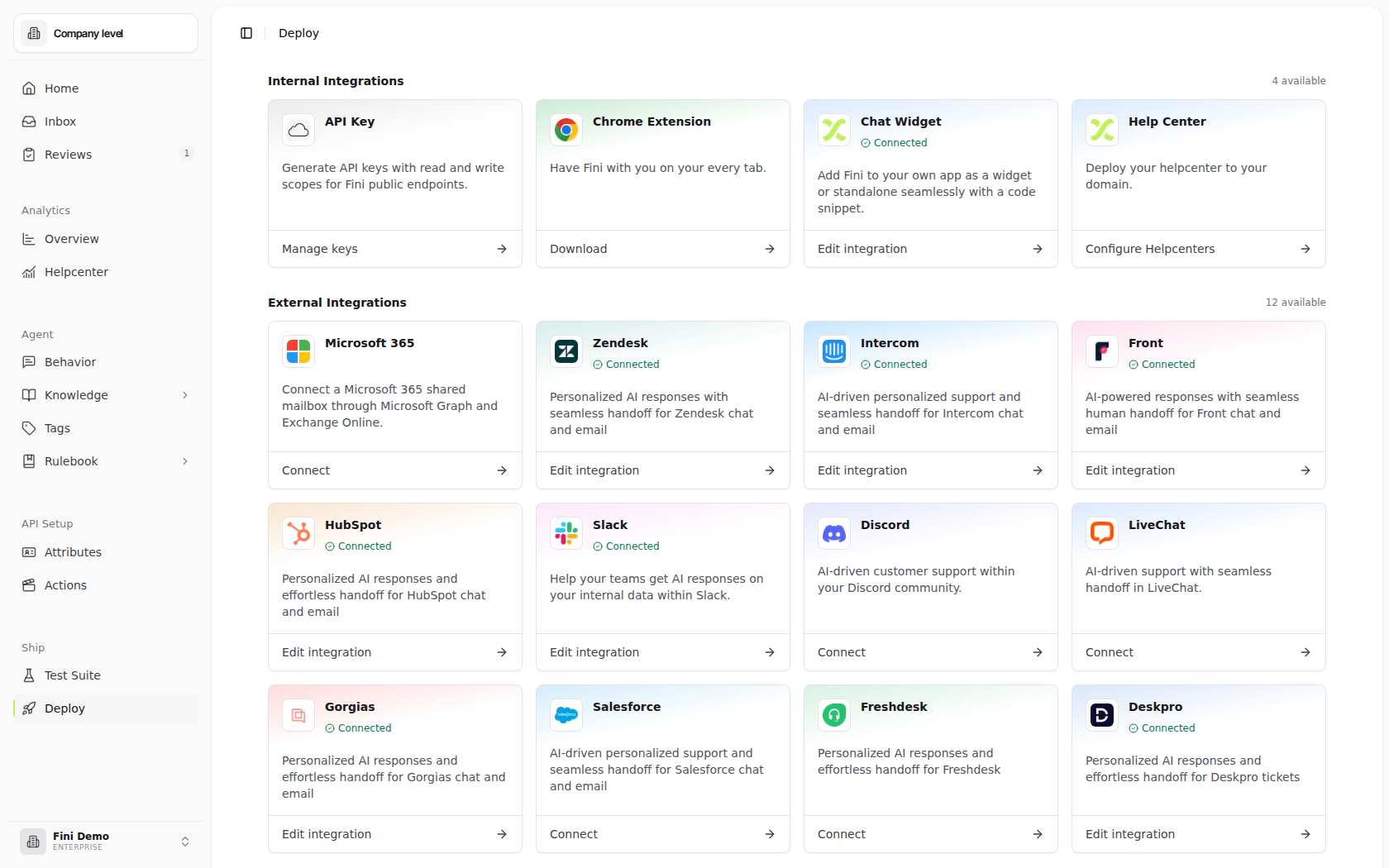
Internal integrations
Surfaces that Fini ships and you control directly. Configure them once and they’re yours — no third-party authorization, no per-channel setup.API Key
Generate workspace-scoped credentials for Fini’s public APIs. Keys can carry
read, write, or both, covering agent and interaction reads, conversation events, document ingestion, and knowledge management.Chrome Extension
Have Fini with you in every tab. Useful for support agents who want the AI in-context while working on a ticket in any web tool.
Chat Widget
Add Fini to your own product as an embedded widget or standalone surface with a single code snippet. Works on web, inside authenticated apps, and on mobile via SDKs.
Help Center
Publish a Fini-powered help center hosted on your own domain — your knowledge base, search-enabled, with the AI agent answering search queries directly.
Create support addresses on your domain that route directly into Fini’s native Inbox and ticket workspace.
Chat widget
A chat bubble customers click to talk to your AI agent. The same widget runs in three contexts:On your website
Anonymous visitors and prospects. Drop the snippet into any page.
Inside your authenticated app
Logged-in customers, with user identity and metadata passed through. The agent sees who’s asking and personalizes accordingly.
iOS and Android
Native SDKs for mobile apps. Same widget, same agent, same configuration.
Help center
A hosted, AI-powered help center, your knowledge base, search-enabled, with the Fini agent answering search queries directly. Set it up in Help Center.External integrations
Surfaces that connect Fini to a third-party tool your team already uses. Setup pattern is the same across them: authorize the integration, pick which Fini agent answers on which channel, and configure reply behavior.Zendesk
Personalized AI responses with seamless handoff for Zendesk chat and email. Supports multiple Zendesk brands.
Intercom
AI-driven personalized support and seamless handoff for Intercom chat and email across one or many workspaces.
Front
AI-powered responses with seamless human handoff for Front chat and email inboxes.
HubSpot
Personalized AI responses and effortless handoff for HubSpot Inbox chat and email channels.
Microsoft 365
AI responses from Microsoft 365 shared mailboxes, routed to the Fini agents you choose.
Slack
Help your team get AI answers on your internal data within Slack — common for IT, HR, and internal ops support.
Discord
AI-driven customer support within your Discord community.
LiveChat
AI-driven support with seamless handoff in LiveChat.
Gorgias
Personalized AI responses and effortless handoff for Gorgias e-commerce support tickets.
Salesforce
AI-driven personalized support and seamless handoff for Salesforce email cases. The most setup-heavy of the helpdesks.
Freshdesk
Personalized AI responses and effortless handoff for Freshdesk.
Deskpro
Personalized AI responses and effortless handoff for Deskpro tickets.
Voice
Fini runs as a voice agent on inbound phone support. Customers reach the same agent through a phone number; calls are transcribed, the agent reasons over your knowledge and rules just like any other surface, and escalates to a human queue when needed. Conversations show up in Inbox alongside chat and email, with the same AI Steps trace available for every turn.Phone-number provisioning and inbound-call routing still require coordination with your Fini contact. Configuring an agent or starting a browser test does not provision a phone number.
API
For backend jobs, internal tools, BI exports, conversation-event submission, and knowledge-management workflows, Fini exposes public HTTP APIs authenticated with workspace API keys. The current route map covers agents, interactions, documents, folders, articles, and knowledge-generation jobs. See API overview and API Keys for the full surface and scope model.The first-layer pattern
Most production Fini deployments follow the same pattern: every customer interaction reaches Fini first. The agent triages, answers what it can, and escalates the rest. This works because the agent has the same knowledge, the same rules, and the same tools regardless of which surface a customer arrived on. A question about cancellation policy gets the same answer whether it came in by email through Zendesk, through the widget on the website, or through a Slack DM to an internal IT bot. The agent doesn’t know or care which surface it’s on, it just answers. What you get from this pattern:- One source of truth. Your knowledge, your prompts, your rules live in one place. Update them once and every channel reflects the change.
- Consistent answers. The customer experience doesn’t depend on which channel they pick.
- Triage at scale. Fini handles the high-volume long tail (password resets, status checks, policy questions, simple how-tos) so your team’s time goes to the conversations that actually need a human.
- Escalations come pre-loaded. When a conversation does reach a human, the agent’s full trace, what was tried, what was retrieved, what the customer’s context is, comes with it. Your team starts the conversation already informed.
Composing surfaces
Surfaces aren’t mutually exclusive. Two common composition patterns:Run multiple surfaces independently
Each surface handles its own traffic. Common when the audiences are different, for example, the widget on your marketing site serves prospects while the Zendesk integration handles existing customers. The agent’s knowledge and configuration can be shared (same bot across surfaces) or split (different bots per surface) depending on how much you want the experiences to diverge.Use the widget, escalate into your helpdesk
The most common combined setup. The agent answers in the widget; if it can’t help, the conversation hands off as a real ticket in your helpdesk. The customer sees a smooth handoff inside the widget; your support team picks up the conversation in the tool they already use, with the full Fini trace attached.Today, Zendesk, Front, Salesforce, HubSpot, and Gorgias can be widget escalation destinations. The other helpdesk integrations (Intercom, LiveChat, Slack) work as direct integrations only, they don’t yet support being the destination for widget escalations.
Where to start
You already use a helpdesk
Click into the integration above. Each page walks through the connect flow and configuration.
You want chat on your site or app
Start with the Widget. Embed in 5 minutes, configure escalation later.
You want a searchable knowledge base
Start with Help Center. Point at your existing articles, publish.