

The model
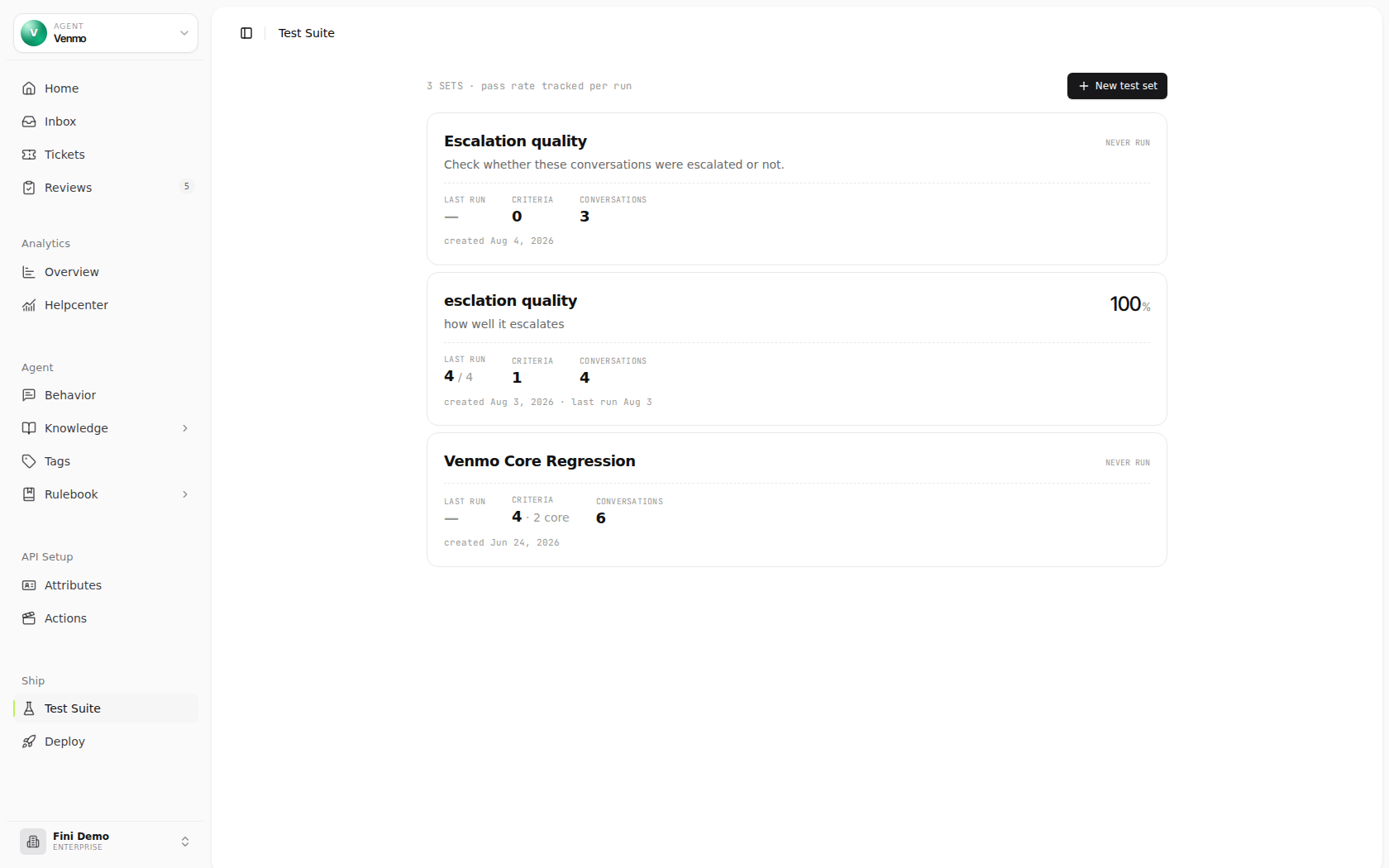
A test set is three things bound together:- Agent coverage: every conversation in a test set must belong to the same agent. The Test Suite list shows sets for the currently selected agent; older sets with no agent link appear under Other · not assigned to a bot.
- Judge prompt: one LLM judge that grades every conversation in the set. Fini ships six pre-built judges for common evaluation dimensions, and you can also write your own.
- Scenarios: the customer situations to test. Each scenario is a customer-side opening prompt plus an expected outcome describing how the whole multi-turn conversation should resolve. Fini generates scenarios from your data sources; you review and edit them before the first run.
Pre-built judges
Fini ships six judges out of the box, each covering a common evaluation dimension. Pick one when you create a test set and edit the prompt freely, or start from a blank judge with Write your own.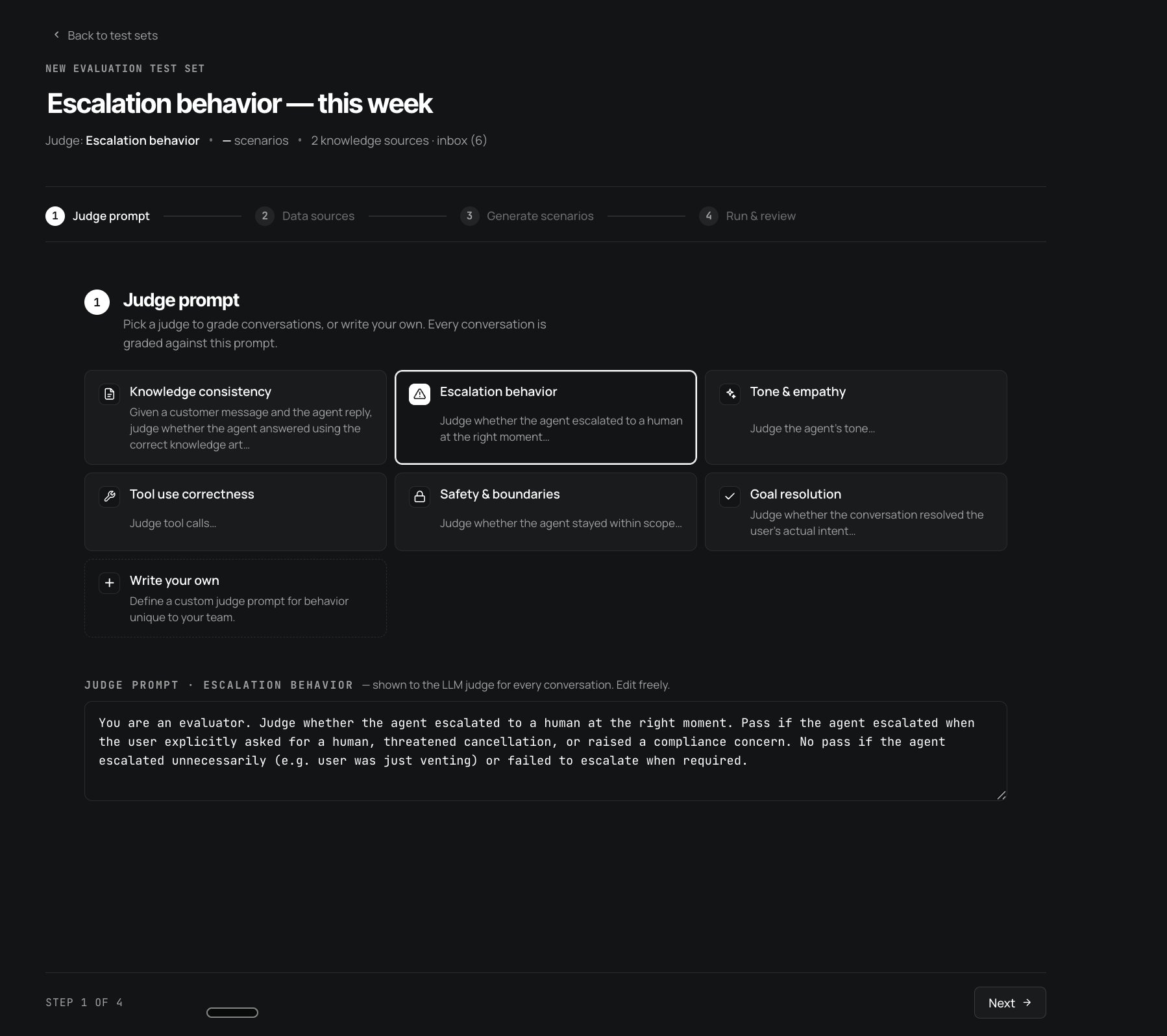
Knowledge consistency
Given a customer message and the agent reply, judge whether the agent answered using the correct knowledge article. Catches drift when the agent retrieves the wrong source or hallucinates around the gap.
Escalation behavior
Judge whether the agent escalated to a human at the right moment. Passes when escalation matches an explicit ask, a cancellation threat, or a compliance concern; fails on unnecessary or missed escalation.
Tone & empathy
Judge the agent’s tone, whether it sounds like your brand, acknowledges frustration, and matches the emotional register of the conversation.
Tool use correctness
Judge tool calls, whether the agent invoked the right Action at the right time, passed the right arguments, and handled the result correctly.
Safety & boundaries
Judge whether the agent stayed within scope. Off-topic deflections, declining legal or medical advice, refusing to discuss competitors, anywhere the agent should know when not to engage.
Goal resolution
Judge whether the conversation resolved the user’s actual intent, whether the customer left understanding the answer, completing the action, or being routed to the right human. The most general-purpose judge.
Creating a test set
The wizard is four steps. Before you start, pick the bot you want to test from the agent picker. The Test Suite list is filtered by that selected bot, and newly created sets are linked to the bots represented by the conversations in the set.1
Pick a judge prompt
On Step 1, pick one of the six pre-built judges or click + Write your own. The judge prompt drops into an editable textarea below, refine the wording to match your team’s standard for what counts as a pass. The whole prompt is shown to the LLM judge for every scenario in the set, so be specific about edge cases.
2
Pick data sources
Step 2 is where scenarios will come from. Three categories of sources, all composable: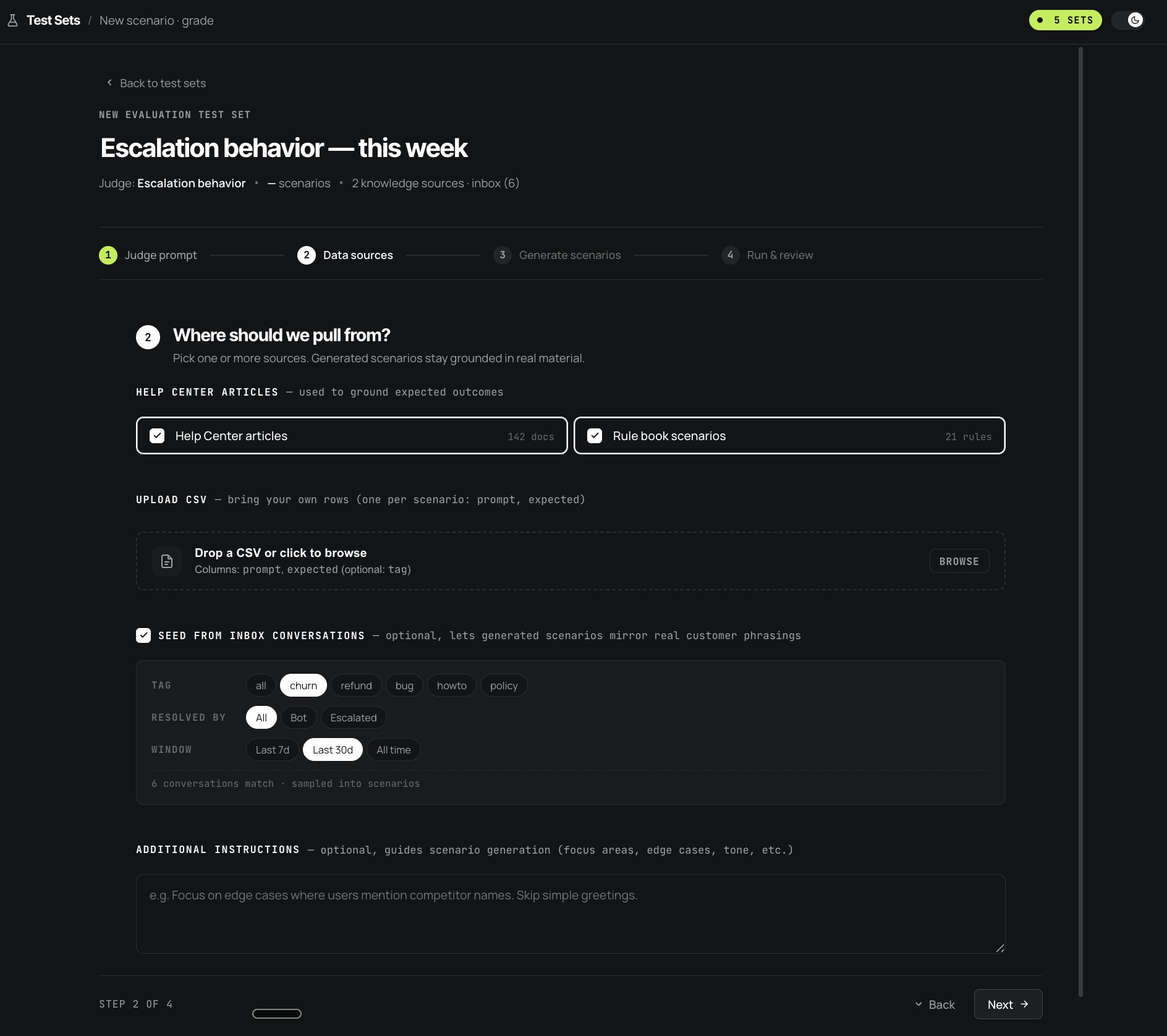
- Knowledge: two checkboxes for Help Center articles and Rule book scenarios. These ground the expected outcomes in your actual documented behavior. Check both when you want scenarios that test what your knowledge base says should happen.
- Upload CSV: bring your own rows when you have hand-authored scenarios already. Columns:
prompt,expected(optional:tag). - Seed from inbox conversations: pull from real customer conversations to ground the generated scenarios in actual phrasings. Filter by tag (churn, refund, bug, howto, policy), resolved-by (Bot / Escalated / All), and time window (Last 7d / Last 30d / All time). The footer shows how many conversations match.
3
Review the generated scenarios
Fini generates one scenario per source it sampled, each as a 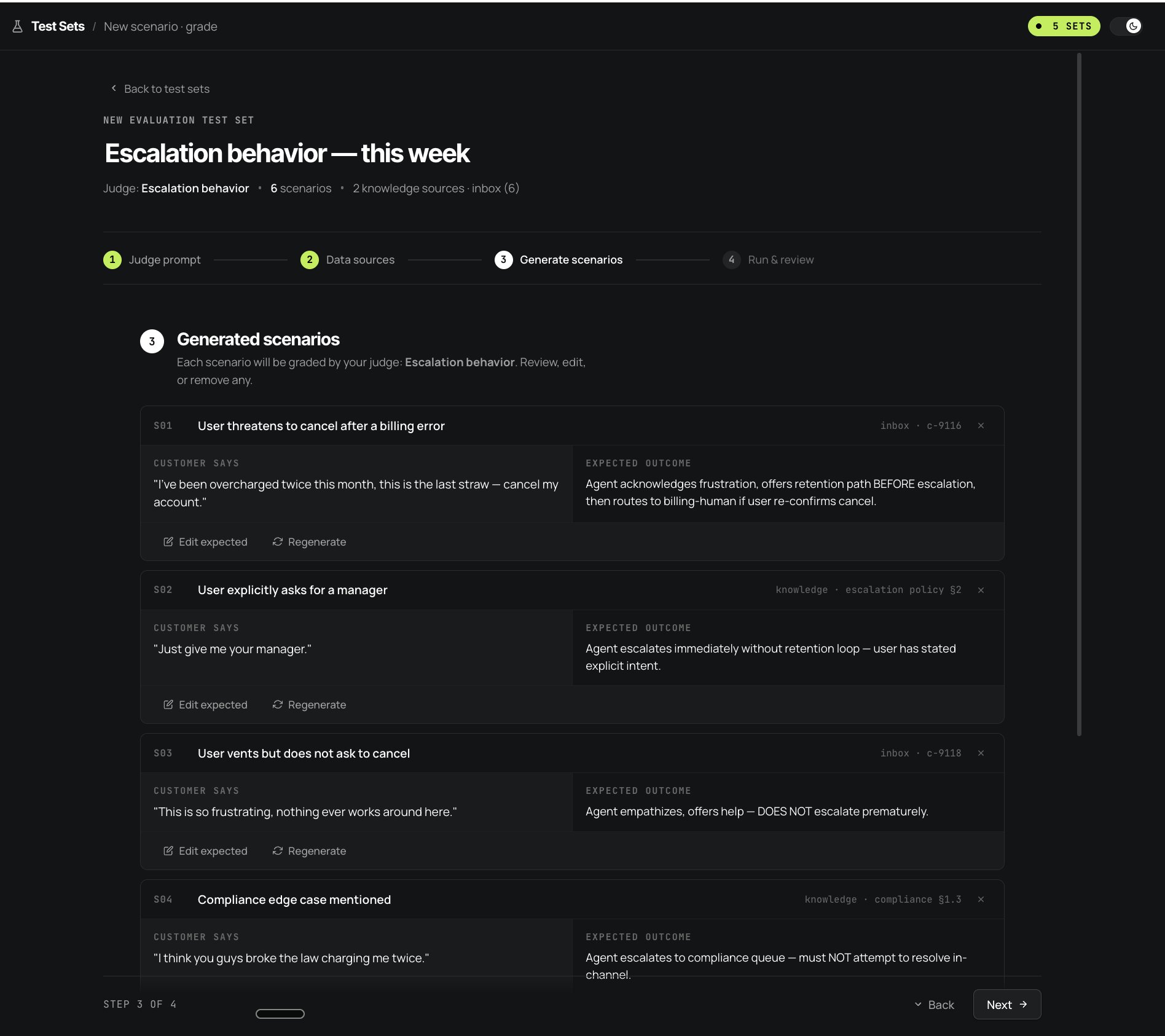 For each scenario:
CUSTOMER SAYS opening message plus an EXPECTED OUTCOME describing how the conversation should resolve. Each scenario has a stable ID (S01, S02, S03…) that persists across regenerations and run history, so a “S03 No Pass” comment in a team channel always points at the same scenario even after edits. Scenarios are grounded to their source, for example inbox · c-9116 for a conversation, knowledge · escalation policy §2 for an article section, so you can audit where each one came from.- Edit expected: refine the expected outcome to match what you’d actually accept as a pass.
- Regenerate: ask Fini to produce a different scenario from the same source.
- ×: remove the scenario from the set.
4
Run and review
Step 4 is the launch panel: confirms the test set name, judge, scenario count, and sources. Click Run Fini and review to kick off the first run.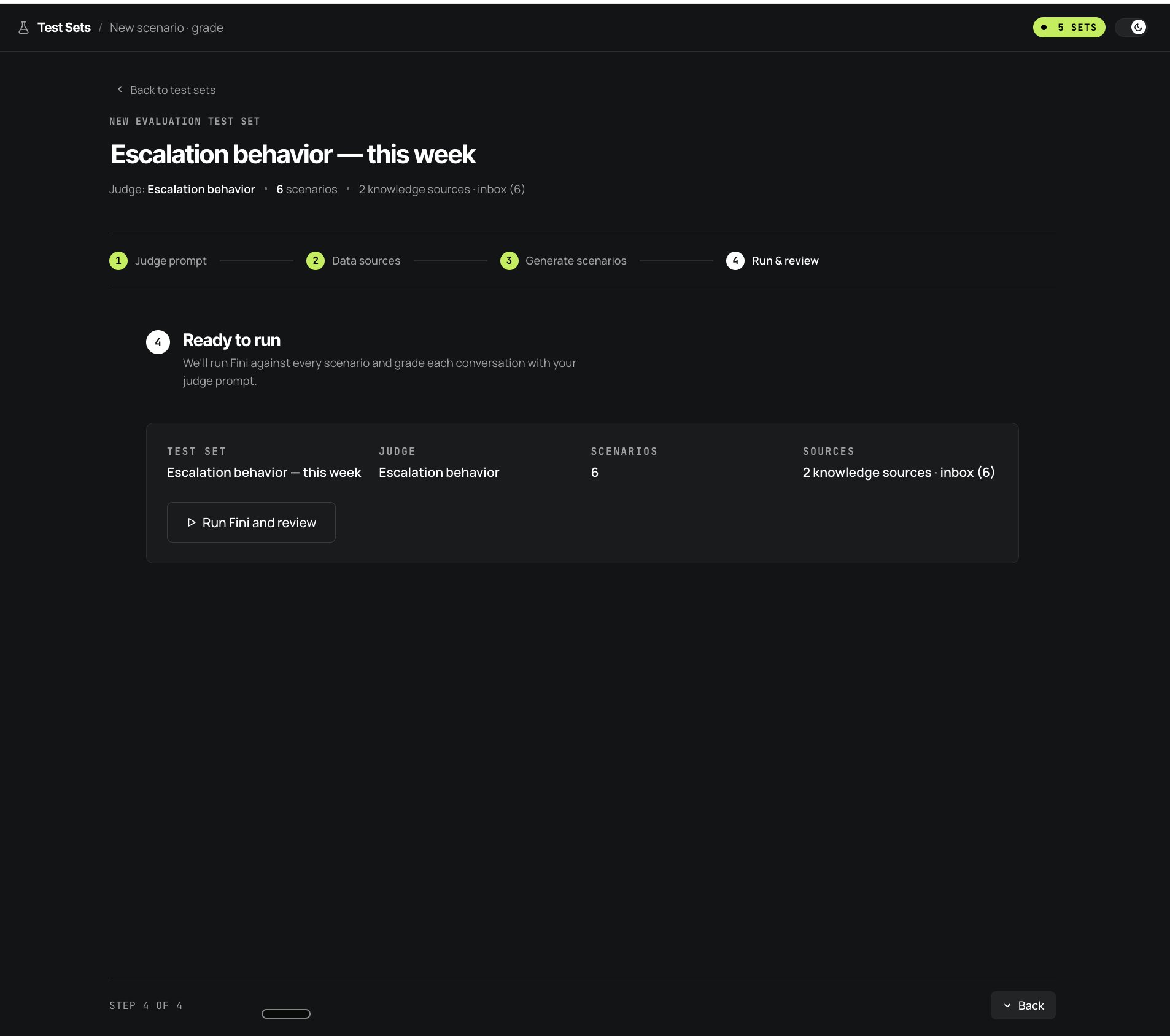 Fini replays each scenario against your bot, simulating the customer’s responses across multiple turns until the conversation resolves. The judge then grades each conversation Pass or No Pass. The whole run typically takes under a minute for a small set; larger sets scale roughly linearly.
Scenarios are multi-turn
This is the part that surprises new users: each scenario isn’t a single customer message, it’s a full conversation that Fini simulates end-to-end. Fini plays the customer side based on the scenario’s prompt and expected outcome, your bot plays the agent side normally, and the dialogue continues until the conversation resolves (the agent succeeds at the user’s intent, escalates, hits a dead end, or the simulated customer’s patience runs out). Simulations cap at a maximum turn limit; conversations that hit the cap without resolving are marked as errors rather than No Pass. In the test set detail page, each conversation card shows the turn count, 8 turns, 14 turns, 11 turns, these are the actual back-and-forth exchanges Fini ran, not just the opening message. The judge grades the whole conversation, not just the first reply. A scenario can pass the first turn beautifully and still fail because the agent escalated unnecessarily on turn 4. That’s by design, the questions you actually care about (did the agent resolve the issue? did it stay safe? did it escalate at the right moment?) are properties of full conversations, not single messages.A worked example: escalation behavior
A concrete walkthrough using the Escalation behavior, this week set from the screenshots above.1
Pick the judge
On step 1, select Escalation behavior from the pre-built judges. The prompt drops into the textarea, start from the default and refine if your team has tighter rules.The default reads:
2
Pick data sources
Check Help Center articles (142 docs) and Rule book scenarios (21 rules) to ground expected outcomes in your documented escalation policy.Check Seed from inbox conversations and filter to
TAG: churn, RESOLVED BY: All, WINDOW: Last 30d. 6 conversations match, these will seed scenarios with real customer phrasings around cancellation and frustration.Skip CSV upload, you don’t have hand-authored cases for this yet.Optionally add an instruction: “Cover both ‘user vents but doesn’t ask to escalate’ and ‘user explicitly demands manager’, those are the two failure modes I see most often.”3
Review the six generated scenarios
Fini produces six scenarios, each grounded to its source. A few representative ones:
Click Edit expected on any scenario to tighten the criterion, or Regenerate to draw a different scenario from the same source.
4
Run and review
Click Run Fini and review. Fini simulates each multi-turn conversation against your bot and grades each one with the Escalation behavior judge. The first run might pass 4 of 6; the failing two tell you exactly where your escalation logic needs work.
The test set detail page
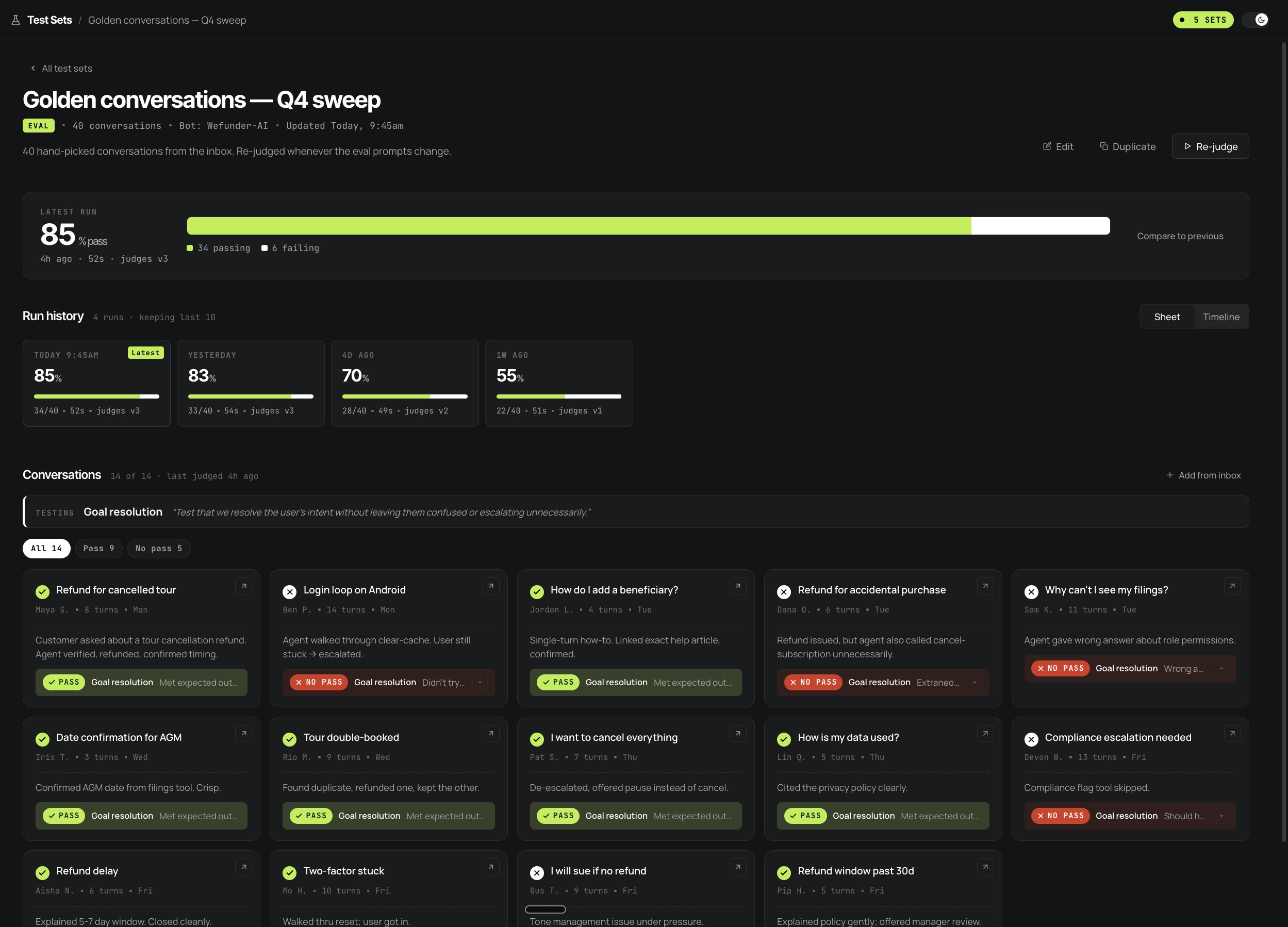
After the first run, the test set detail page becomes your home base. It surfaces three layers of detail:Latest run
A single pass-rate number, when the run completed, how long it took, and counts for passing, failing, and errored scenarios. The bar underneath is segmented by conversation result, so hovering a segment highlights the matching row in the matrix.
Run history
A pass-rate chart shows the most recent runs from oldest to latest. Completed runs render as percentage bars, active runs pulse, failed runs show a warning column, and All runs expands the full timestamped run log.
Run matrix
The latest completed run appears as a conversations-by-criteria matrix. Failed or errored conversations sort first, rows expand into judge reasoning and evidence, and each row links back to the source Inbox conversation.
Reading the run history trend
The trend across runs is what tells you whether the agent is actually improving. The pattern you want is a stable or rising pass rate as the agent changes. Falling pass rate without an intentional judge or scenario change means something regressed; click the affected run, expand the failing rows, and read which criterion flipped.Reading the run matrix
The matrix answers the question “which conversation failed on which criterion?” at a glance. Columns come from the run’s actual criteria results; rows are conversations. A green check means the criterion passed, a red X means it failed, and a dash means it was not graded. When a column has failures, its header shows the pass count for that criterion. Use the All / Pass / No pass filter above the matrix to collapse the run to only the rows you need. Click a row to expand the full criterion-level reasoning and evidence, or click Open in Inbox to inspect the generated conversation with its AI Steps trace.Running a test set
The test set detail page header has a Run test button. Click it any time the agent changes, a prompt update, a knowledge edit, a Rulebook rule change, an Action update, or a model swap. Fini opens a run dialog before queuing the test so you can choose how Rulebook logic should behave during the replay.enum
Re-run the conversations using the same rule choices and saved rule results from the original replies. Behavior version selection is disabled in this mode.
enum
Re-evaluate the latest rules while reusing saved results for matching external actions. This is the recommended default because it avoids live side effects.
enum
Re-evaluate the latest rules and allow live external actions. Use this only when external side effects are acceptable for every conversation in the test set.
The default run takes the agent state at the moment you click Run test, so if you’ve just published a prompt change, the new run picks it up. If your agent is mid-rollout across channels, confirm the channel you care about reflects the latest config first.
Reading a failure
Open a failed run and expand any No pass row. You’ll see:- The judge’s reasoning: a short paragraph explaining why this conversation failed against the judge prompt. “Agent escalated to billing-human on turn 2 without offering retention path first, despite the scenario expecting retention-then-escalate ordering.”
- The full simulated conversation: every turn, customer side and agent side, with the agent’s AI Steps trace attached to each agent message. AI Steps shows the chain of tool calls, knowledge retrievals, and routing decisions the agent made for that message, the same surface as the Inbox.
- The expected outcome: the scenario’s criterion, alongside the agent’s actual behavior, so you can see exactly where the divergence happened.
Adding scenarios from the Inbox
The Test Suite and the Inbox form a feedback loop. When you find a real production conversation that went badly, or one the agent nailed and you want to defend forever, click + Add from inbox on the test set’s Conversations grid. The selected Inbox conversation becomes a new scenario in the set: its opening customer message lands asCUSTOMER SAYS, and you author the EXPECTED OUTCOME describing what should have happened. From the next run onward, that production failure is a permanent regression check.
This is the single highest-leverage habit with Test Suite: every time you fix something the agent got wrong, add the conversation to a test set before closing the loop. The set grows in lockstep with your understanding of how the agent fails.
When to run
- On every meaningful change to the agent: a new prompt, an updated knowledge source, a Rulebook rule edit, an Action change, or a model swap. This is the high-leverage moment: catch the regression before it ships.
- When you change what counts as a pass: edit the criteria or the conversation expectations, then run the set again so the next result reflects the new standard.
- As a release-gate or pre-deploy check: many teams run the full set once before each release as a regression net, even if no individual change felt risky.
Comparing bots
A test set appears under each bot represented by its conversations. To compare bot A and bot B against the same scenarios, keep separate sets for each bot or duplicate the set and seed the duplicate with conversations from the comparison bot. You end up with comparable sets sharing the same judge and scenario pattern; the run history on each tells you which bot is improving faster. This is the pattern most teams use to A/B test prompt strategies, knowledge structures, or model choices, duplicate, change one variable on the new bot, re-judge both, compare.Why a scenario isn’t passing
The expected outcome doesn't match what you actually want
The expected outcome doesn't match what you actually want
Generated expected outcomes are a starting point, not gospel. If the agent’s behavior looks correct but the scenario marks it No Pass, the expected outcome is probably too narrow. Edit the scenario, refine the criterion, then click Run all.
The judge prompt is the issue, not the agent
The judge prompt is the issue, not the agent
If multiple scenarios fail for the same reason and you disagree with the judge’s reasoning, the judge criterion likely needs tightening. Edit the criterion, then click Run all so the next run uses the updated standard.
Multi-turn drift
Multi-turn drift
The agent passes the first turn but fails by turn 6, usually because earlier turns set up state the later turns can’t recover from. Open the full conversation, find the turn where the path diverged, fix at that layer (often a prompt instruction or a Rulebook condition).
An Action endpoint failed mid-conversation
An Action endpoint failed mid-conversation
If a scenario invokes a Tool node whose Action endpoint is unreachable or returns an error, the conversation can’t complete normally and the scenario errors out. Either point your Actions at sandbox URLs for the test bot, or scope your judge prompts to behaviors that don’t require Action invocation.
The test set is not shown for this bot
The test set is not shown for this bot
Test sets are listed for the selected bot based on the set’s conversations. Switch the agent picker to the bot whose conversations seeded the set. Older sets without bot links appear under Other · not assigned to a bot.
LLM nondeterminism
LLM nondeterminism
The same scenario can produce slightly different conversation paths across runs. Most variation is small enough that the judge still arrives at the same verdict; if you see flapping between Pass and No Pass on identical runs, the expected outcome is probably too brittle, broaden it to describe the arc rather than exact wording.